 MCP Cadwork Python API Server
MCP URL: https://pyapi.mcp.cadwork.dev/mcp
What is MCP?
The Model Context Protocol (MCP) is an open standard that enables AI assistants to securely connect to external context. Think of it as a bridge that allows AI models to access real-time, specialized information beyond their training data.
When you connect an AI assistant to an MCP server, it gains the ability to query that server for relevant context, making responses more accurate and up-to-date.
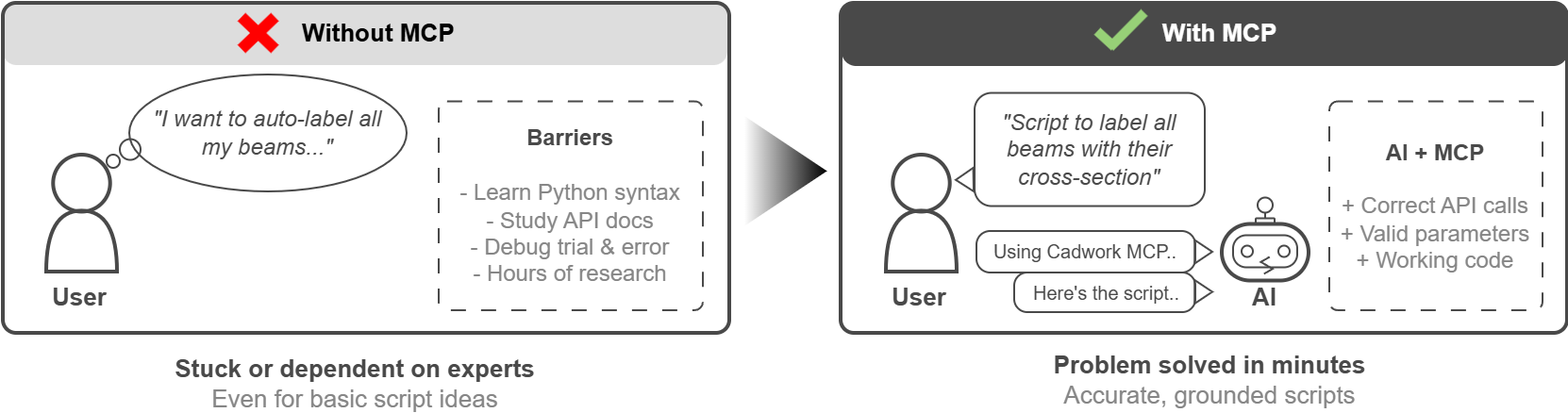
Demo
See how easy it is to use the Cadwork Python API with an MCP-enabled AI assistant:
You can use the Cadwork Python MCP for:
- Contextual Answers: Ask questions in natural language and get responses that reference the actual API documentation, including function signatures, parameters, and code examples.
- Code Generation: Request script snippets for specific tasks. The AI can generate code using the correct Cadwork API functions because it has direct access to the documentation.
- Discovery: Explore available modules and functions by simply asking "What functions are available for geometry operations?" or "How do I work with elements?"
- Troubleshooting: Describe an error or unexpected behavior, and get help that's grounded in the actual API specifications.
Setup instructions
To use the Cadwork Python API documentation as an MCP server, you need to configure your AI assistant to connect to it. Here are the most common ai code assistants and how to configure them:
Claude Desktop
Add the following to your Claude Desktop configuration file via the UI:
Settings > Connectors > Add custom connectors
Claude Code (CLI)
Claude Code supports MCP servers natively. Add the server using:
1 | |
ChatGPT
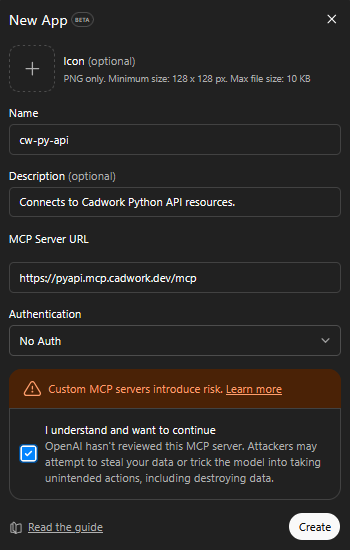
ChatGPT does support MCP servers connector (they are called App) but only on developer mode. You need to activate it first and then:
Settings > Apps > Create app (Developer mode: on) > Create app
VS Code (GitHub Copilot)
Add the following to your VS Code settings file (.vscode/mcp.json in your workspace or user settings):
1 2 3 4 5 6 7 8 | |
Gemini CLI
Gemini CLI supports MCP servers natively through its command-line interface.
Prerequisites: Install the Gemini CLI first:
1 | |
Add the server:
1 | |
Verify the connection:
1 | |
Once added, the Cadwork Python API documentation will be automatically available when you interact with Gemini CLI.